Chrome Steps Up as the Browser Wars Heat Up
The web browser market is becoming competitive again as AI-focused companies and startups push into the space. Because of this shift, Google Chrome can no longer afford to stay still. Google has now announced three new Chrome features designed to improve productivity and strengthen its ecosystem. These additions aim to keep everyday tasks inside the browser without relying on external apps.
Split View Makes Multitasking Simpler
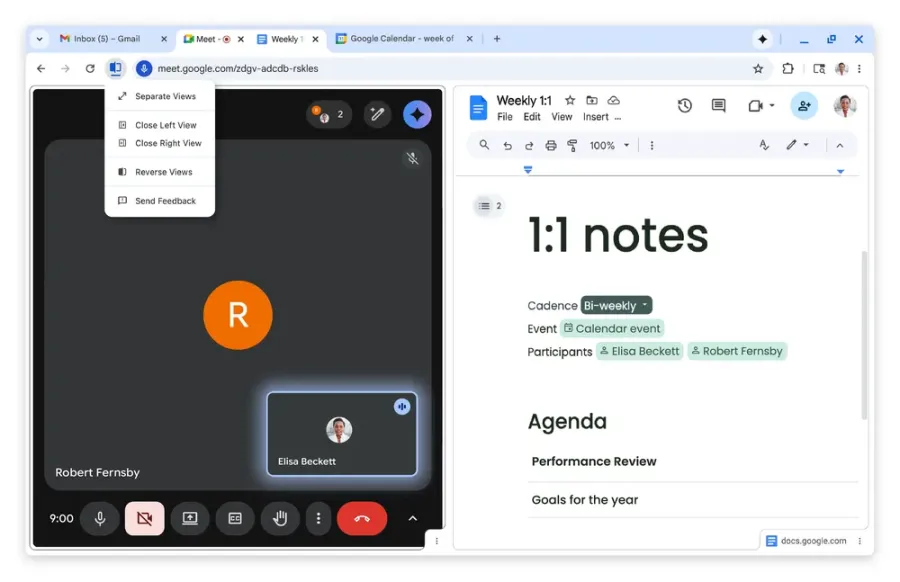
The first new feature, Split View, focuses on multitasking. Users can now open two web pages side by side within a single tab. This makes it easier to watch videos while taking notes or compare information across sites. To activate the feature, users can drag a tab to either side of the browser window or right-click a link and choose Split View. When finished, another right-click exits the mode and returns the tab to normal.
PDF Annotations Built Directly Into Chrome
Chrome also gains long-awaited PDF annotation tools. Users can now highlight text and write notes directly inside PDF files without downloading them or opening separate software. As a result, reviewing documents, filling out forms, and signing files becomes faster. This upgrade significantly improves Chrome’s role as a work-focused browser, especially for users who handle documents daily.
Save PDFs Straight to Google Drive
Another key update adds a “Save to Google Drive” button when viewing PDFs. With one click, files save directly to cloud storage instead of cluttering local download folders. Chrome automatically places these files inside a “Saved from Chrome” folder in Google Drive. This system helps users stay organized and access documents from any device.
AI Pressure Shapes Chrome’s Direction
Although this update does not focus heavily on AI features, Google has already integrated Gemini into Chrome. This move responds to growing competition from companies such as OpenAI and Perplexity, which continue to explore AI-powered browser experiences. Increased competition has clearly pushed Google to deliver improvements faster than before.
What Comes Next for Chrome
This update follows Google’s recent expansion of Gemini support to Chromebook users. Looking ahead, Chrome plans to introduce vertical tabs, a layout inspired by browsers like Arc and Dia. Vertical tabs promise a cleaner way to manage large numbers of open pages. Together, these changes show Google’s intent to modernize Chrome while keeping its massive user base engaged.
According to reports from TechCrunch, Chrome’s latest update reflects a broader strategy to remain dominant in an era where browsers must do more than simply load web pages.
Origin: TechCrunch